













✔ Patient Now link & BOOK NOW button confirmation page, Shop update link
Completed by Nicol R.
- Assigned to
-
 Isaac K.
- Due on
- Notes
-
Hello
I forgot to include, please also add a BOOK NOW button to every confirmation page on desktop and mobile with the link for the patient now portal.
Can a noticeable button be placed below the contact message and above the map? (see picture below).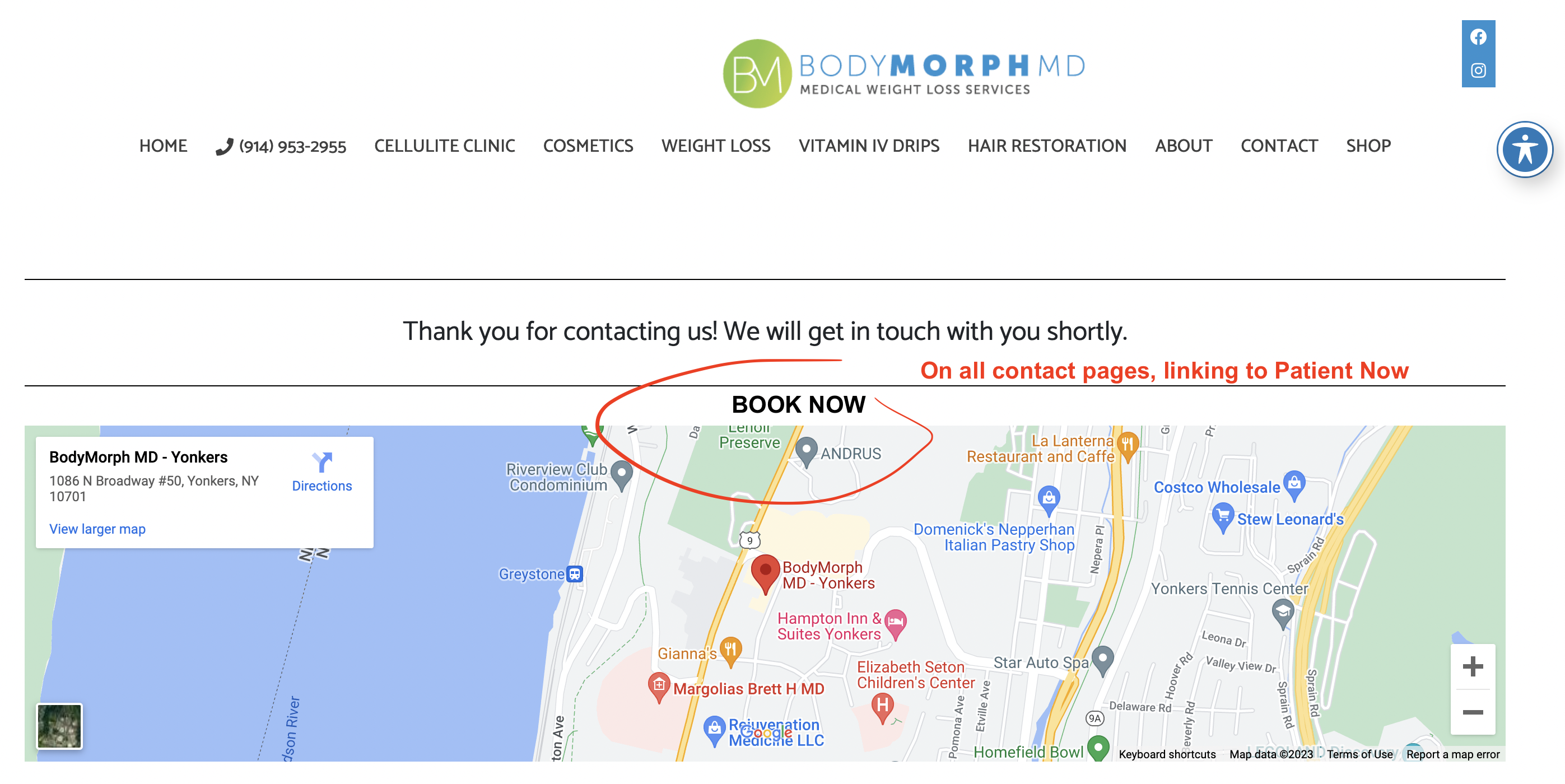
For consistency, here are instructions sent via email. Thank you!
**
1. Here is the correct link for Body Morph MDs, Patient Now portal: https://portal.mypatientnow.com/practice/1377/login
Can you please add a BOOK NOW button on the Scheduling page here, above the Schedule A Free Consultation, that goes to the link above in a new tab (on both mobile and desktop). See the screenshot below
and add a BOOK NOW link to the CONTACT drop-down menu that will go directly to the above link.
2. Please update the button underneath the products in the Shop Page that say "Add to Cart" to go to the appropriate links. Right now, the product's Add To Cart button doesn't go to any link.
Emsculpt button "Add To Cart" go to this link: https://bodymorphmd.com/product/emsculpt/
Emtone button "add to Cart" go to this link: https://bodymorphmd.com/product/emtone/
If you need additional information, below is a video made in Incognito mode going through the shopping cart showing that the button doesn't link to the cart.
https://watch.screencastify.com/v/MyR5glOtUu8jjQo6kNk8
Thank you!
ADDED
ADDED
ADDED
Please update the button underneath the products in the Shop Page that say "Add to Cart" to go to the appropriate links.
I have now updated the website so when someone clicks on "add to cart" it will automatically add the product to the cart and also show this message to view the cart. (Please see below screenshot). If someone clicks on the product image or title. It will take them to the product details page.
If they can add us as a team member that would be great because this way we wouldn't have to coordinate a time with them and ask a verification code that will be sent to their email or mobile phone. They can add support@medstarmedia.com as a team member.
Below article contains the step to add us a team member.
https://squareup.com/help/us/en/article/6316-add-an-administrator-or-authorized-representative
https://bodymorphmd.com/c/microneedling/
I'll let you know when we have the square info.
Thank you, and thank you